Ashlr Verse 3.22 · The coding agent workbench
Work with me.
Work for me.
Bring Claude Code, Codex, Grok, local models and Devin into one workbench. Guide an agent in a chat, or delegate work to the fleet. Shared accounts and projects connect both workspaces.
Keep your chats, drafts and tools close. Let eligible fleet agents land verified work within the scope you sign once with Touch ID, including the change-volume limits you choose.
Choose a workflow
See how the work moves.
Think, build and steer together.
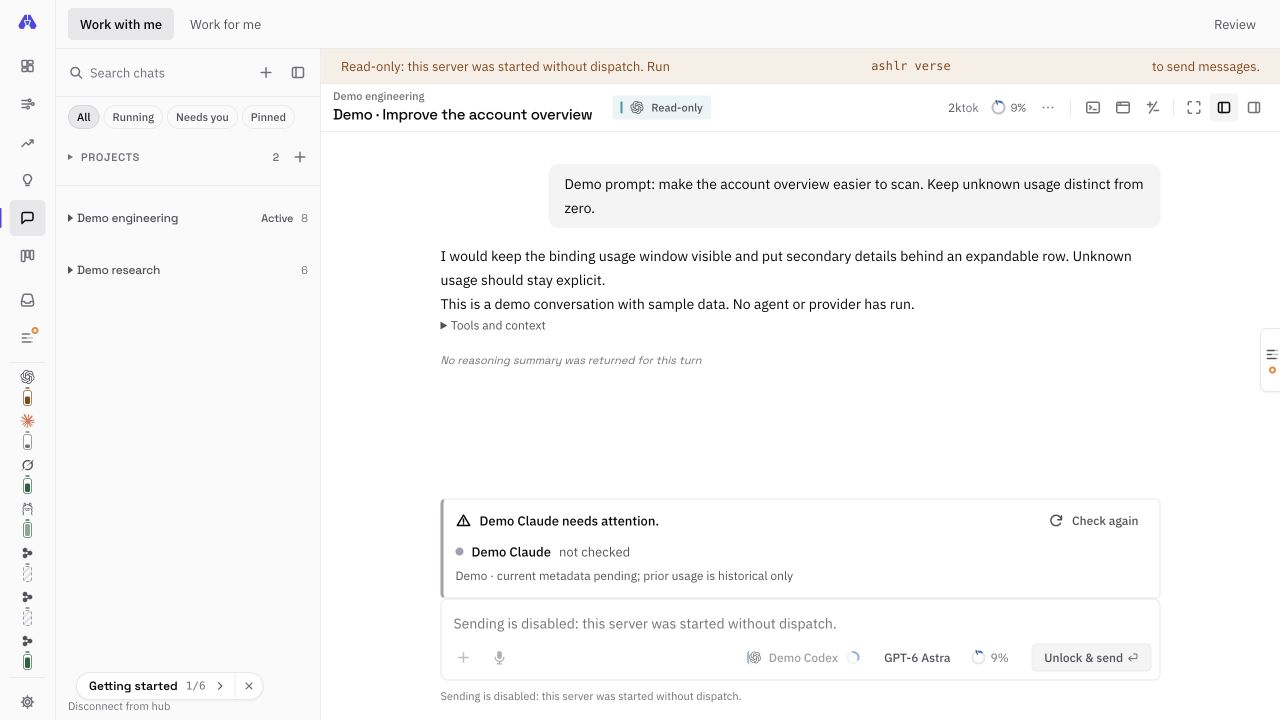
Choose an account and model, guide it in a chat, inspect reported tools and context, and review the changes beside the conversation.
Choose your account, model and project. Your prompt stays editable until you send it.
Switch workspaces without losing your drafts or restarting a session.
Give the fleet an outcome.
Delegate tasks, guide the Leader's planning and see what needs you. An admitted resident fleet works within the repository, account and spending scope you sign.
Choose repositories, accounts and standing permissions. Review the exact scope before Touch ID approval.
Eligible elite-direct work lands without a separate judge. Stop and revocation remain available.
Illustration · select a mode, then inspect its stages. No agents are launched.
Autonomy rollout:starts in shadow after your Touch ID grantactual activation and merge authority are shown in the Fleet tab
 DevinCLI: Cognition SWE-2 · Cloud: API v3Signed-in CLI seat defaults to SWE-2 High. Cloud sessions use ACUs and separate guardrails.
New in 3.14 · The Leader
One brain, one thread, wherever you are.
The Leader reads what the fleet actually did and writes memos: the bottleneck, one move with an expected result and a date, and questions for you. Now you can answer. Verse, Telegram and the CLI all read and write the same conversation, so a directive you send from your phone is in force at your desk.
Move: one repair goal on a Grok seat. Expected: verify green on the retry suite within 48 h.
ashlr leader answer lm-…:0 "yes, ashlrcode only"An illustrative exchange. The thread, channel badges, directives, memo card and buttons are the real surfaces; the words are an example. While the ladder is at shadow, memos are dry runs and carry no buttons.
- Directives
- Start a line with
focus:,stop:orpriority:from any channel, and it rides in every memo run until you retire it. Directives steer the Leader's judgement; they never widen your grant. - Approve or veto
- Class-A actions apply at once, class-B after a veto window, class-C only go to you. Approving early runs the same checks as the window closing. Veto runs the recorded inverse.
- Telegram
- A real two-way line: replies thread into the conversation, memos arrive with Approve, Veto and Details buttons, and
/leader,/status,/directives,/settings,/help. A morning brief and an evening recap, an instant brief when you text “status”, quiet hours, and one question at a time. - Founder mode
- Text “go build X” and it becomes work in the cheapest lane that can do it, under your grant and each lane’s budget. Its new powers, cloud and Devin launches, playbook and automation edits, carry a class and a veto window like every other action.
- Always answers
- Grok first, then fast and large local models; Claude only for a weekly deep run or by opt-in, never Codex. Failed runs retry at 15 min, 45 min and 2 h. When it cannot think, it says why.
- Check-ins
- Every 2 hours in working hours, but only when the evidence changed. A new directive or answer counts. Advisory, with editable daily-run preferences, and never retried.
Autonomy with custody
It merges only inside a scope you sign.
Autonomy ships dormant. You install a custody helper, create a key in your Mac's Secure Enclave and sign a standing grant with Touch ID: which repositories, which engines, what risk and size, what spend, for at most 30 days. Then you start the resident daemon yourself. Nothing else, not config, not the Leader, not an agent, can widen what it may do.
The rollout ladder
- Default first stage1 · shadowGates run, would-merges recorded, nothing merges
- 2 · 2aFirst repos merge, low risk
- 3 · 2bMore repos
- 4 · 2cLeader class A
- 5 · 3aMedium caps, Leader A and B
- 6 · 3bMore repos
- 7 · 3cMore repos
- 8 · 3dLast signed stage
The default grant draft starts in shadow. The ladder advances when each stage's criteria are met
in the ledger (shadow: 5 would-merges and 12 hours), drops back one on a breach, and cannot pass
the last stage you signed. A separately signed elite-direct grant uses one rung instead:
eligible elite models may land verified PRs immediately, and a breach restarts that rung's evidence
window. Command shows the current stage, progress and the grant's countdown.
Every change, through the same gates
- G0Authority
- G1Protected paths
- G1bTamper
- G2Scope
- G3Verify
- G4Claims
- G5Blast radius
- G6Judge or signed elite-direct
- G7GitHub checks
Fleet lists every shadow decision with these chips and a one-sentence reason, so you can read what the fleet would have done before it does it.
- Reversible merges
- When a stage merges, the merge happens on GitHub, pinned to the head SHA, with grant, gate and ledger trailers. CI and a fresh re-run watch it for two hours; a red merge is reverted and the repository quarantined. Protected paths always go to you.
- Host-verified
- The fleet's GitHub App posts
ashlr/verifyonly when verification passed on exactly the tree it proposes. Free-plan private repos, which cannot have rulesets, use local enforcement with the same check and low-risk scope. - Stop and revoke
- Lowering never asks: the switch drops to Propose or Off at once, Stop halts running agents and armed merges, and Revoke needs a new grant to resume. A broken ledger chain halts everything.
- Re-approval
- A release that changes authority code pauses the grant until one more Touch ID, and the ladder continues from where it was. The resident daemon re-verifies grant, Stop and switch on every tick.
- Your change-volume limits
- Choose files and lines per change and merges per repo per day when reviewing the signed scope, or explicitly choose no volume cap. Existing grants keep their old effective limits until you edit and sign them. Risk, protected paths, spending and verification remain separate.
| Mode | What admitted autonomy may use |
|---|---|
| all-in | Use available capacity. Signed account settings still apply. |
| balanced (default) | Claude keeps 40% of its weekly window for you, and autonomy never uses it while the five-hour window is above 70%. Grok keeps no reserve. Local models have no per-token provider charge and run within available local capacity. |
| reserve | Free local models first; 85% of every paid window is kept for you. |
Codex is off for autonomy unless enabled. In an admitted run, a seat whose usage cannot be read is ineligible, because your reserve is not spent on a guess.
The multi-seat workbench
Your chats, accounts and fleet, in one place.
A seat is an account and the CLI that drives it, pinned to its own profile so a turn never lands on the wrong account. Connect two Codex accounts and you have two Codex seats. When one runs out of window, move to the next without changing tools. Native CLI seats use each vendor CLI’s sign-in and isolated account profile.
Qwen3.8 27B
Historical four-bit run · ~151s / turn
Your own GPU through llama.cpp. Slot count follows your runtime configuration. No provider quota or per-token fee; throughput depends on the loaded model and hardware.
Grok 4.7
Historical runs · ~16–21s / turn
The fast lane, and a build-fast variant. Sessions resume by native id, so a long task keeps its context across turns.
Fable 5.1 & Opus 5.5
Subscription
Driven through its own CLI and profile. Remaining quota is visible before you spend it, from metadata probes that cost no tokens.
Your account’s model catalog
Multiple accounts
Enroll several Codex accounts, each pinned to its own home directory. GPT-6.1 Sol appears when the account’s own catalog lists it.
Six destinations, two work modes, one palette
Command, Fleet, Growth, Mind, Chat, Agents
Command for what needs you; Fleet for runs and decisions; Growth for lessons; Mind for the Leader; Chat for sessions; Agents for the running roster. Work with me and Work for me switch the workspace without restarting your chat.
Resources, ready or not
Every account with its live windows and reset times, local runtimes, cloud credits and Devin. Each card says “Chat: ready” and “Fleet: ready · reserve kept”, or why not and the command that fixes it.
Needs you
Owner-lane and cloud or fleet proposals with gate verdicts, Devin CLI chat links for manual review, the Leader's questions and seats to reconnect. Single-key triage where eligible: A land or approve, R reject, V veto.
Command palette
Every chat, action, seat, project and repo. Message the Leader, add a directive, open a repo wiki, ask the codebase, run in cloud or in Devin.
Queue, attach, steer
Queues up to 3 turns while one runs; attachments, @ files and / commands; four permission modes, with Bypass red and confirmed per chat.
Terminal, Browser, Changes
Shells with command blocks and a read-only Agent tab; a browser the chat’s agents can look through but never click in; a checkpoint before every turn, with Accept, Reject, Undo and Redo; Sources and Reasoning beside the chat.
Reasoning as it happens
Claude, Codex and Grok stream their reasoning, then collapse it to “Thought 12s, ~1.8k tok”. Every figure on the status line is measured from the CLI's own events.
Optional phone access
Your fleet, in your pocket.
Open Verse in an iPhone browser from anywhere after you opt in on your Mac. A separate phone gateway sits behind Cloudflare Access; only a Mac-approved passkey can pair a device. The main console and its tokens stay on the Mac.
Know what needs you
Read fleet activity, chats and the Needs you queue in a mobile layout. Optional push notifications carry no task content.
Approve with your device
Stop an agent, approve a plan or land an eligible pull request with fresh device authentication. Standing grants are still signed on your Mac with Touch ID.
Keep control on the Mac
The gateway is off until you configure it. Pairing approval and device revocation happen locally; live access needs the Mac awake and online.
Operator setup: Access, a private gateway config and Mac approval are required.Read the phone runbook
New in 3.15 · Wiki and lessons
It knows your code, and it learns only what you approve.
Two ways the fleet gets smarter about your repositories without handing your code to anyone you did not choose, and without teaching itself anything behind your back.
A private wiki for every repo
An overview, a module map with the import graph and blast radius, key flows, data stores,
commands and “how to change X” guides. Every file:line citation is
checked against the repository before it is kept; the rest are removed and counted. Pages are
written by your local models, by Grok only if your grant allows it, never by Claude, and with no
model at all they are built from repository facts alone. They live only on your Mac and rebuild
only when the files they cite change. Ask the codebase answers with citations, or says
“not found”.
Lessons you sign off on
Every way a task ends, a merge, a refused gate, a failed verify, a revert, a closed PR, a vetoed Leader action, becomes a short retro with a stable root cause, what to do differently and a better prompt. Knowledge it suggests is used only after you approve it in Growth ▸ Lessons, and only where its repo, paths and task kind match, within a 16 KiB cap. When nothing matches, the prompt is byte-identical to before. Changes to a repo's AGENTS.md go through the gates like any other PR.
# the same wiki from the terminal
ashlr wiki build ashlr-hub
ashlr wiki ask "where are standing grants verified?"
Cloud and Devin lanes
Hand a task off. Get a pull request back, through the same gates.
Claude Code cloud sessions keep running remotely on your signed-in Claude account. Eligible promotional credits are used first, then included plan usage where available. Paid-only models and enabled over-limit usage can use purchased credits. Devin cloud sessions run on your Devin ACUs. Both are told to deliver exactly one pull request from their own branch, with a report block, and never to merge.
Claude cloud sessions
Start one from a chat, from Command or with ashlr cloud launch, or let Verse work
through its own improvement backlog under a daily cap. Claude does not expose the credit balance,
so spend is a labelled estimate you correct on claude.ai. Under a standing grant, a cloud PR on a
granted repo lands only through the gates.
Devin CLI, powered by SWE-2
Connect a signed-in Devin CLI as a Verse seat. It defaults to Cognition SWE-2 High; Medium and Max are also in Devin's model picker. CLI chat stays in Verse; a PR link it prints appears in Needs you. Fleet CLI work follows the separate proposal and gate path.
Devin cloud is separate. Connect its API key in the macOS Keychain with
ashlr devin connect, then use Run in Devin or ashlr devin launch.
Sessions have ACU caps and a reserve. Verse does not identify their underlying model as SWE-2.
Cloud PRs need two independent model families before a granted stage may merge them.
Eligible CLI work can pass G6 without judges only under a Touch ID-signed
elite-direct grant. All other gates still apply; work outside scope waits for you.
| Limit | Claude cloud | Devin cloud |
|---|---|---|
| Budget | $250 (estimate) | 50 ACU |
| Per session | $3 est. | 10 ACU cap |
| At once | 4 | 2 |
| Per day | 20 sessions | 30 ACU, 10 sessions |
| Kept in reserve | $40 | 10 ACU |
3.19 · controlled startup regression
A slow account should not hold up the others.
Two metadata workers now refill each freed slot independently. The same concurrency and cleanup rules remain.
Synthetic regression fixture: one mocked account takes 20 seconds; three others take 10 ms each. Both paths allow two clients. These are controlled test-clock observations, not provider latency or a live startup benchmark. Inspect the test.
Measure your own configuration with ashlr benchmark run; this explicitly starts local model work. ashlr benchmark --compare-reports BASE CANDIDATE is offline and refuses incompatible or uncontrolled receipts. It reports matched observations, not universal savings. Benchmark guide.
3.20 · evidence for autonomous choices
Useful work before a qualified reset.
The fleet matches eligible accounts with selected tasks, using reported deadlines and completed work observations. Resource details show the estimate and its limits.
Missing deadlines and work history stay unknown. Jev can advise among eligible choices; normal routing checks current account capacity again. A percentage is never treated as a token allowance. Read the scheduling guide.
Recorded online qualification · October 1: one multi-file rename fixture passed its checker in 392.5 seconds, changing three files across 12 turns. The requested local model was Qwen3.8 27B Q8_0; the runtime reported its model name as unknown. Cache state was uncontrolled, so this is one observed run, not a baseline/head comparison or a general performance claim. Inspect the sanitized receipt.
3.22 · learn from recorded outcomes
Follow the work. Improve the next run.
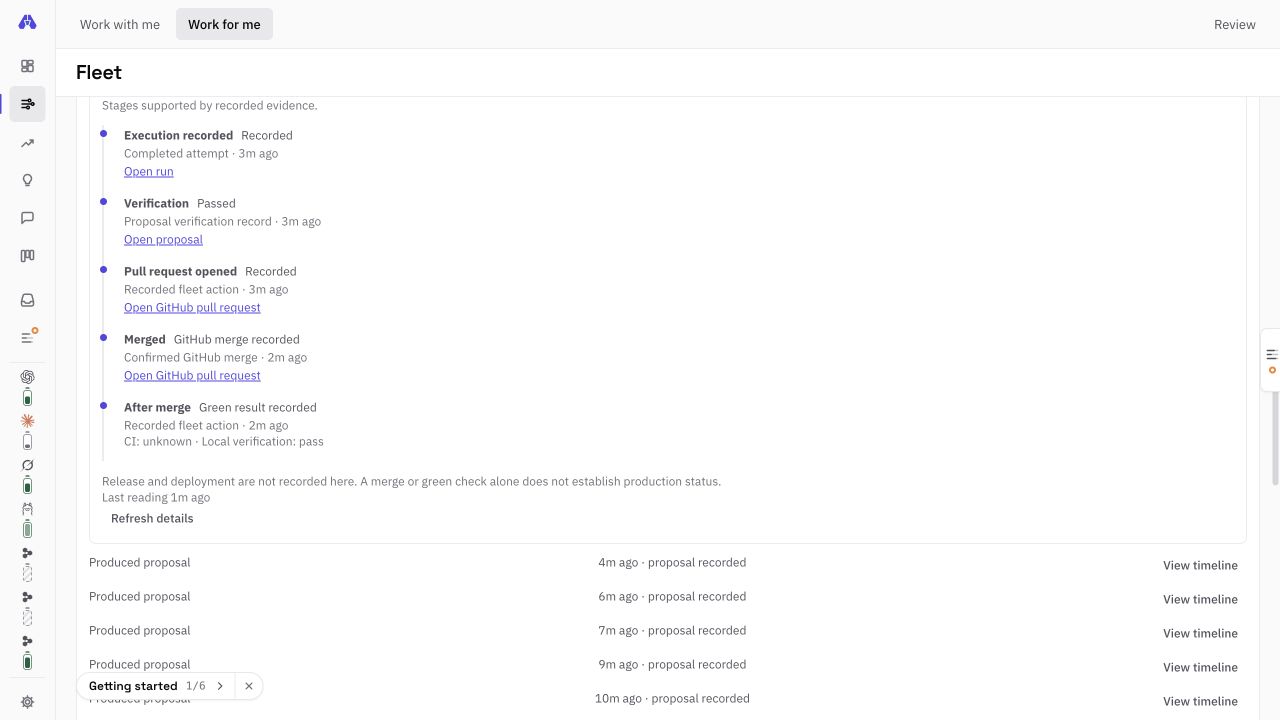
Expandable Fleet feedback connects recorded attempts to verification, GitHub PRs, authenticated merges and follow-up checks. The Leader uses recorded outcomes when planning the next useful task.
Producer success, a recorded proposal and shipped work remain separate. Replayed records do not multiply lessons; incomplete data stays visible. Opening feedback uses a shared background read without calling a model. Inspect the feedback contract.
Subscription deadlines guide useful work before reset. Purchased balances remain separate. Gray historical usage keeps its original timestamp while live readings load; captured dollar balances retain their capture time and expiration. Understand resource evidence.
Historical local-model measurements
One bug was costing 23,500 tokens a turn.
Claude Code appends a token counter to every request, and it changes each turn. Verse was folding that into the system prompt, ahead of the whole conversation, so the prompt prefix changed on every request and llama.cpp could reuse none of its cache. Every turn reprocessed the entire context. The work was correct the whole time. It was just slow.
Prompt tokens reprocessed per turn
Aggregate decode throughput by batch size
| Workload | Before | After | Change |
|---|---|---|---|
| Prompt tokens reprocessed per turn | 23,500 | 34–556 | −98% |
| One agent, wall clock | 333s | 151s | 2.2× |
| Four agents in parallel, wall clock | 1,386s | 540s | 2.6× |
Worth saying plainly, because most tools will not: on a single GPU, local parallelism buys throughput rather than speed — about 1.1× more work per minute than running the same agents one after another. That is a property of one piece of silicon, not a limit of the local console. Seats on different accounts can run in parallel when their providers and resources allow it. Separate machines can run independent Verse workspaces; coordinated multi-machine control is not shipped.
The large win above was the cache fix, and it helps a single agent just as much.
One machine, one GPU, four local slots
| Path | Before | After |
|---|---|---|
/api/verse/control, warm | 5.2–6.1 s | 2.9–4.1 ms |
/api/verse/usage-series, warm | 1.3–3.4 s | 0.3–0.5 ms |
| Replay 10k chat events | 17 s | 0.9–2.4 ms |
| Render per streamed delta at 5k events | 50 ms | 1.0–1.3 ms |
| First-chat-paint JavaScript | 615 KB | 366 KB |
The table shows the 3.10 result. In 3.11.2, first-chat-paint JavaScript fell to 349.7 KB, meeting the 350 KB target. The 3.10 runtime probe measured a 53–78 ms event-loop stall against a 20 ms budget; no newer result is reported here.
How local actually works
Discovery and dispatch are different problems.
Most local setups collapse them, then wonder why the model picker goes empty. Keeping them apart is what lets dispatch move onto the fast runtime without losing the seat list.
Why discovery stays put
Which models you have, their context window, and whether they can call tools at all come from Ollama. A model without tool support cannot drive an agent session, so Verse hides it rather than letting you pick something that fails on the first turn.
Why dispatch is opt-in
The proxy is a separate listener from llama-server. Inferring the lane from “llama-server is up” would point every local seat at a closed port. So it is a switch, and an unset or malformed value falls back to the lane that already works.
Context
The context meter reads the real window.
Every window and compaction point comes from the pinned CLI binaries, each seat's own model catalog and the CLIs' own reports at runtime. None of it was produced by prompting a paid model. Before 3.9 the meter was wrong on every engine. A Claude 1M session went red at 180k, and the Codex meter summed every call in the turn.
Where each seat compacts
git diff --stat. There is no model call. The new chat can run on any seat, and nothing is sent until you press send.Platforms
What actually runs where.
The CLI and the console run on all three. The native desktop shell, the custody helper behind autonomy and OS-level sandboxing are not uniform yet, so here is the real state rather than three logos in a row.
macOS
- ✓CLI and console
- ✓Desktop app, with the Terminal and native Browser panes
- ✓Custody support: Secure Enclave key, Touch ID
- ✓Local models via llama.cpp
- ✓Sandboxing with
sandbox-exec - ✓Apple silicon desktop DMG, locally signed; no Apple notarization
- ✓Resident autonomy under a Touch ID grant you start yourself
- ✓Devin key in the Keychain
Windows
- ✓CLI and console
- ✓Per-account profile isolation
- –No desktop package
- –No custody helper, so autonomy stays dormant
- –Falls back to env-only isolation
Linux
- ✓CLI and console
- ✓Sandboxing with
bwraporfirejail - ✓Local models via llama.cpp
- –No desktop package produced
- –No custody helper, so autonomy stays dormant
Get started
Open the console. Talk to the Leader. Turn on autonomy when you are ready.
Install and open the console
Inspect reported tools and context in each chat, and open source-line evidence from the local module map. Install Verse 3.22.2 with the same CLI command on all three platforms. On an Apple silicon Mac, you can also download the Verse 3.22.2 desktop DMG. It is locally signed, not Apple Developer ID notarized, so macOS may require Open Anyway on first launch.
New in 3.22: fast account-bound usage history, separate credit balances, collapsible projects, and execution timelines connecting verification to GitHub. Expand Resources for dated readings and credit details, or Fleet to inspect an outcome.
npm i -g https://github.com/ashlrai/ashlr-hub/releases/download/v3.22.2/ashlr-hub-3.22.2.tgz
ashlr verse
Connect your accounts and local models
Prepare a private profile per account, then sign in with the vendor's own login. Search your account and model choices in the workbench. There is no fixed roster count cap; quotas and available hardware govern how much runs at once.
ashlr resources profile prepare --provider claude \
  --directory ~/.ashlr/native-profiles/claude-a \
  --executable /path/to/claude
Talk to the Leader
Open Mind with ⌘4, or from the terminal. Add Telegram for a two-way line on your phone, or configure the separate phone gateway for browser access.
ashlr leader say "focus: the flaky retry test"
ashlr comms setup-telegram
Turn on autonomy
macOS only. Setup does what it can and stops for what only you may do: the custody install, Touch ID, two GitHub clicks. Then you start the resident daemon in your own terminal. The default signed ladder begins in shadow; a separately signed elite-direct grant can begin verified merges immediately.
ashlr authority setup --dry-run
ashlr authority setup
ashlr authority resident start
Optionally, connect Devin cloud
Devin CLI is a separate signed-in seat and defaults to SWE-2 High. Cloud sessions need a Devin plan with API access and Devin's GitHub integration on the repos they may touch. Decide on Devin's training opt-out first.
ashlr devin connect
ashlr devin budget --acu 50
What you need
Node.js 22.15 or newer, and Git. Ollama for local model discovery. Whichever agent CLIs you already use. For the cloud lane, a Claude account with cloud sessions enabled and a GitHub origin for the repository. For Devin cloud, a plan with API access. A 27B model at eight-bit holds about 27 GB of weights resident, plus its cache; budget comfortably above that.
Verse never asks for your provider credentials. It drives each CLI with its own pinned profile. The main console is loopback-only and requires its startup token; optional phone access uses a separate Access-protected gateway and a Mac-approved device.
Guides: Verse, the Leader, autonomy, cloud and Devin.